

A delivery driver app helps logistics companies assign deliveries, update shipment statuses, capture proof of delivery and keep drivers connected with dispatch teams from a mobile device.
For courier companies, freight forwarders, distributors and last-mile delivery businesses, managing drivers through spreadsheets, phone calls and WhatsApp messages can quickly become difficult as delivery volume increases.
Instead, a delivery driver application connects the driver directly with the logistics operation.
The result is a simpler workflow:
Assign → Drive → Deliver → Capture Proof → Update Status
What Is a Delivery Driver App?
A delivery driver app is a mobile application used by drivers to manage deliveries assigned to them.
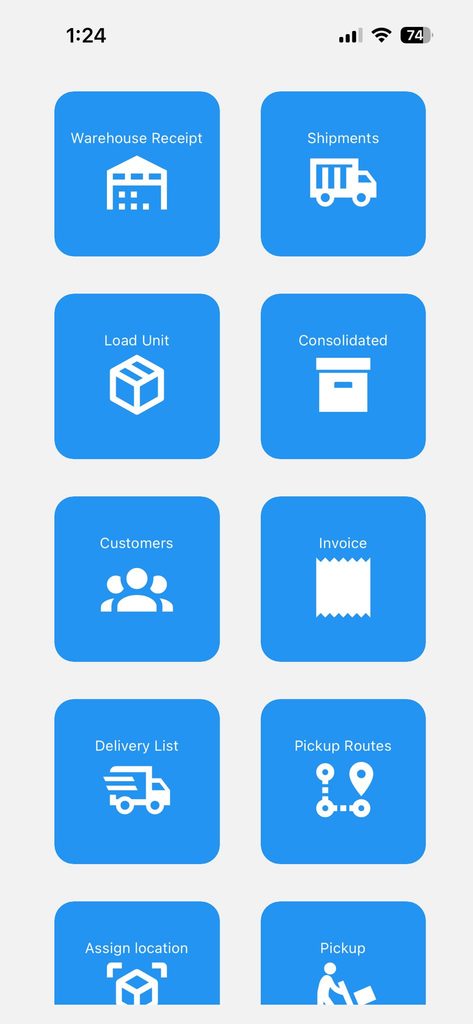
Depending on the software, drivers may be able to:
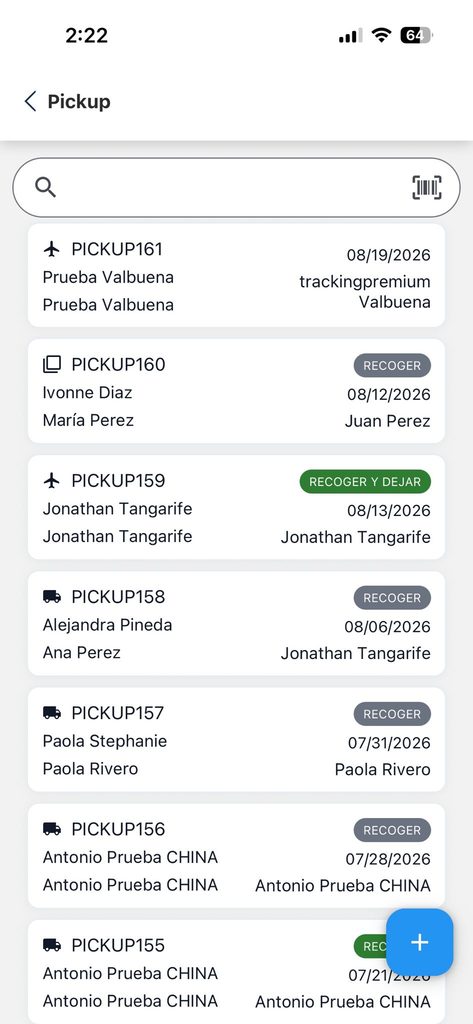
- view assigned deliveries;
- access customer addresses;
- check shipment information;
- update delivery status;
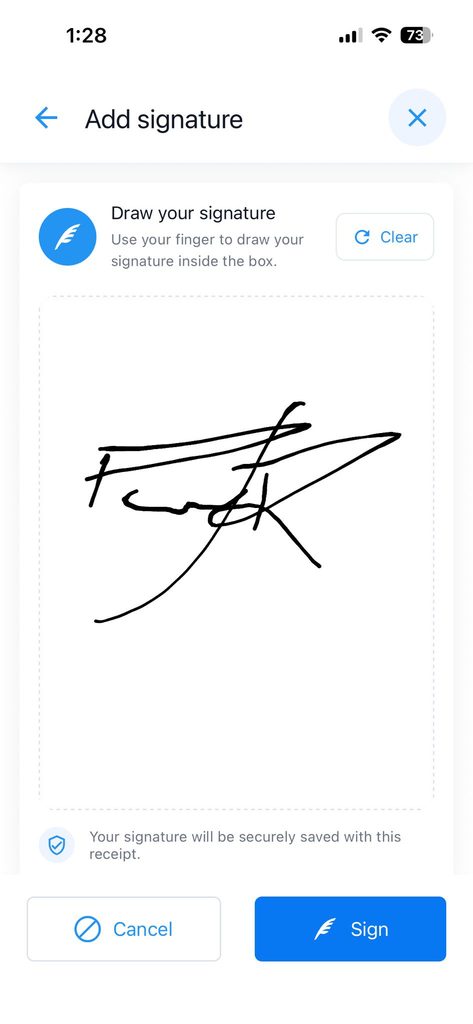
- capture signatures;
- take delivery photos;
- record delivery attempts;
- add comments;
- confirm completed deliveries;
- access navigation;
- report delivery problems.
Therefore, the driver does not need to return to the warehouse to update every shipment.
Instead, information can be captured while the delivery is happening.
How Does a Delivery Driver App Work?
A typical workflow begins when a shipment is ready for delivery.
For example:
Shipment Ready → Driver Assigned → Out for Delivery → Delivered → Proof of Delivery
The dispatcher assigns a shipment to a driver.
Next, the driver opens the mobile app and sees the delivery details.
These may include:
- customer name;
- delivery address;
- phone number;
- tracking number;
- shipment number;
- number of packages;
- delivery instructions.
Once the shipment is delivered, the driver updates the status.
The system can then automatically update the tracking information available to the customer.

Delivery Driver App for Last-Mile Delivery
Last-mile delivery is the final stage of transportation between a warehouse, distribution center or local agency and the recipient.
Although it is the last part of the journey, it can be one of the most operationally demanding.
Common problems include:
- incorrect addresses;
- unavailable customers;
- failed delivery attempts;
- missing proof of delivery;
- drivers calling dispatch repeatedly;
- customers asking where their package is;
- packages being assigned to the wrong driver.
A delivery driver app for last-mile operations helps centralize these activities.
Instead of managing the process through multiple communication channels, drivers and dispatchers work from the same information.
Assign Deliveries to Drivers
One of the most important features of delivery software is driver assignment.
A dispatcher may have dozens or hundreds of deliveries waiting.
For example:
Driver 1
Miami Beach – 24 deliveries
Driver 2
Doral – 31 deliveries
Driver 3
Kendall – 19 deliveries
Driver 4
Fort Lauderdale – 27 deliveries
The system can organize shipments before they leave the warehouse.
As a result, the company knows which driver is responsible for each package.
What Information Should Drivers See?
A delivery driver should have access to the information required to complete the delivery without seeing unnecessary administrative data.
The application may display:
Customer
John Smith
Address
125 Example Street, Miami, FL
Shipment
MIA0012548
Packages
3 pieces
Status
Ready for delivery
Instructions
Leave with reception and request signature.
Clear information helps reduce calls between drivers and the operations team.
Delivery Driver App With GPS Navigation
Drivers need a reliable way to reach each destination.
A delivery application may connect addresses with navigation applications available on the driver’s device.
This allows the driver to move from:
Delivery information → Address → Navigation
However, navigation and delivery management are not the same thing.
A navigation application helps the driver reach a location.
A delivery driver app helps the company control the shipment, driver, delivery status and proof of delivery.
Out-for-Delivery Status Updates
Customers frequently want to know when their package has left the warehouse.
A driver app can automatically connect the driver’s activity with shipment tracking.
For example:
Ready for Delivery
becomes
Out for Delivery
when the delivery process begins.
Later:
Out for Delivery
becomes
Delivered
once the driver completes the shipment.
This connection keeps tracking information aligned with the actual operation.
Proof of Delivery
Proof of delivery, commonly known as POD, is evidence that a shipment was delivered.
A delivery application can capture several types of POD.
These may include:
- customer signature;
- delivery photograph;
- recipient name;
- delivery date;
- delivery time;
- driver information;
- notes.
Keeping this information connected to the shipment helps companies handle customer questions and delivery disputes.
Electronic Signatures
A driver can request a signature directly from the mobile device.
The customer signs on the screen.
Then the application stores the signature with the shipment.
For example:
Shipment: MIA0001458
Delivered: September 10
Received by: Maria Rodriguez
Signature: Captured
Driver: Driver 12
This creates a digital record without requiring a paper delivery manifest.
Delivery Photos
Sometimes a signature is not necessary or available.
A driver may instead take a photograph.
Photos can document:
- package at the front door;
- shipment at reception;
- customer pickup;
- damaged packaging;
- delivery location;
- special circumstances.
The image can then be associated with the corresponding shipment.
Therefore, the company has additional evidence of what happened during the delivery.
Record the Name of the Recipient
The person receiving the shipment may not always be the person listed as the customer.
For example, the shipment could be received by:
- receptionist;
- family member;
- warehouse employee;
- security guard;
- office manager.
The driver can enter the recipient’s name before completing the delivery.
That information remains in the shipment history.
Failed Delivery Attempts
Not every delivery is successful.
A driver might arrive and discover:
- customer unavailable;
- incorrect address;
- business closed;
- access denied;
- customer refused package;
- phone number unavailable.
Instead of simply marking the shipment as incomplete, the driver can record the reason.
For example:
Delivery Attempt 1
Customer unavailable.
Delivery Attempt 2
Business closed.
Delivery Attempt 3
Delivered successfully.
This history provides useful operational information.
Reschedule Failed Deliveries
After a failed attempt, a dispatcher may need to return the shipment to the delivery queue.
A delivery management system can help reschedule the shipment.
The workflow becomes:
Failed Delivery → Return to Queue → New Assignment → New Attempt
Therefore, the shipment does not disappear from a spreadsheet or manual list.
Delivery Driver App for Courier Companies
Courier companies often manage much more than the final delivery.
A package may pass through several stages:
Warehouse Receipt → Package → Consolidation → Shipment → Destination Warehouse → Delivery
A driver application should connect with these previous steps.
For example, once a shipment arrives at the destination warehouse, it can become available for delivery assignment.
The dispatcher assigns it.
The driver completes it.
Finally, the customer tracking updates automatically.
Delivery Driver App for Freight Forwarders
Freight forwarders may also manage local deliveries after international transportation.
Consider a consolidated shipment arriving in Miami.
The consolidated cargo may contain shipments for 20 different customers.
After deconsolidation, each shipment may require a separate delivery.
A delivery driver application allows the company to assign those shipments individually while maintaining their relationship with the original cargo operation.
Delivery Software for Multiple Drivers
A growing delivery operation needs visibility across multiple drivers.
A dispatcher should be able to answer questions such as:
- How many deliveries does each driver have?
- How many are completed?
- Which ones failed?
- Which shipments are still pending?
- Which driver has package MIA012456?
- Which deliveries need to be reassigned?
A centralized system makes this information easier to access.
Driver Performance Dashboard
Delivery data can also be used to evaluate performance.
For example:
Driver A
32 assigned
30 delivered
2 failed
Driver B
29 assigned
29 delivered
Driver C
35 assigned
31 delivered
4 pending
This gives supervisors visibility into daily activity.
However, driver performance should not be evaluated only by delivery count.
The type of route, distance and delivery complexity also matter.
Delivery Status Tracking
Good delivery software should maintain clear shipment statuses.
Common examples include:
Pending
Assigned
Out for Delivery
Delivery Attempt
Delivered
Returned
Canceled
Each status represents a meaningful point in the delivery process.
As a result, operations teams can quickly understand what is happening without contacting the driver.
Customer Tracking Integration
Customers should also be able to see relevant delivery information.
For example:
8:10 AM
Shipment assigned for delivery.
9:15 AM
Out for delivery.
1:42 PM
Delivered.
The customer does not necessarily need access to every internal driver action.
Instead, the tracking page should communicate the events that matter most.
Delivery Notifications
A delivery driver app can trigger customer notifications.
For example:
Your package is out for delivery.
Later:
Your shipment has been delivered successfully.
Notifications may be sent through:
- email;
- SMS;
- WhatsApp;
- mobile push notifications.
Therefore, tracking becomes proactive rather than completely dependent on customers checking the website.
WhatsApp Delivery Notifications
For some courier companies, WhatsApp is an important communication channel.
When the driver changes a shipment to Out for Delivery, the system may trigger a corresponding notification.
After completion, another message can confirm the delivery.
For example:
Your shipment MIA001548 is out for delivery today.
Then:
Your shipment MIA001548 was successfully delivered.
However, companies using WhatsApp should follow the applicable WhatsApp Business policies and consent requirements.
Delivery Driver App With Payment Information
Some delivery operations require payment before or during delivery.
Depending on the workflow, the driver may need to know:
- balance due;
- COD amount;
- delivery fee;
- invoice status;
- payment instructions.
The application can display relevant payment information.
However, financial permissions should be controlled carefully so drivers only access what they need.
Cash on Delivery
Cash on Delivery, or COD, can require additional tracking.
For example:
Shipment value: $250
Amount collected: $250
Payment method: Cash
Driver: Driver 7
The company may then reconcile collected amounts with completed deliveries.
This is especially useful for operations where drivers handle payments.
Delivery Driver App for Multiple Agencies
Courier companies frequently operate from more than one location.
For example:
Miami Warehouse
Orlando Agency
Houston Warehouse
Each location may manage its own delivery drivers.
The software should allow operations to remain separated while management maintains centralized visibility.
This becomes increasingly important as the company expands.
Mobile Barcode Scanning
Barcode scanning can also help during the delivery process.
Before leaving the warehouse, the driver can scan packages assigned to the route.
This helps answer an important question:
Did the correct packages physically leave with the correct driver?
For example:
Driver route contains 38 packages.
Driver scans:
38 of 38 confirmed.
If only 37 are scanned, the team can investigate before the driver leaves.
Reduce Delivery Errors Before the Driver Leaves
Many delivery problems begin at the warehouse.
A package may be placed in the wrong vehicle.
Another may remain behind.
A shipment may be assigned to a driver but never physically loaded.
Scanning creates another control point.
The process becomes:
Assign → Scan → Load → Deliver
Therefore, discrepancies can be identified earlier.
Delivery Route Organization
Drivers may have many stops during one shift.
Organizing deliveries by geographic area can reduce unnecessary movement.
For example:
Route 1: Miami Beach
Route 2: Doral
Route 3: Hialeah
Route 4: Kendall
A delivery system can help dispatchers group orders logically.
More advanced systems may also work with routing and navigation tools.
Delivery Driver App vs Google Maps
Google Maps and delivery management software solve different problems.
Google Maps answers:
How do I reach this address?
A delivery driver app answers:
Which package should I deliver, who receives it, what happened during delivery and where is the proof?
Therefore, many delivery operations use both.
Navigation gets the driver there.
Delivery software controls the operation.
Why Not Manage Drivers Through WhatsApp?
WhatsApp is useful for communication.
However, managing an entire delivery operation through chat can become difficult.
Imagine a dispatcher handling 100 shipments.
Messages could include:
“Delivered.”
“Customer isn’t home.”
“Send me the address.”
“Which package is next?”
“I left it with reception.”
“Here is the photo.”
Important information becomes scattered across conversations.
Instead, a delivery app stores each event directly under the corresponding shipment.
WhatsApp can remain a communication channel without becoming the operational database.
What Should the Best Delivery Driver App Include?
Companies evaluating delivery software should look for practical operational features.
A strong solution may include:
- driver assignments;
- mobile access;
- shipment search;
- barcode scanning;
- delivery statuses;
- GPS navigation integration;
- delivery photos;
- signatures;
- recipient information;
- failed delivery reasons;
- proof of delivery;
- customer tracking;
- notifications;
- user permissions;
- reporting.
The best solution depends on the company’s actual workflow.
More features are not automatically better if drivers cannot use them easily.
Benefits of a Delivery Driver App
A delivery driver app can help companies improve several areas of their operation.
Better shipment visibility
Dispatchers know which driver has each shipment.
Faster status updates
Drivers update deliveries directly from the mobile device.
Digital proof of delivery
Photos, signatures and recipient information remain attached to the shipment.
Fewer repetitive calls
Operations teams do not need to contact drivers constantly for updates.
Better customer communication
Tracking and notifications can update automatically.
More operational control
Failed deliveries, completed deliveries and pending shipments can be analyzed from one system.
When Does a Business Need a Delivery Driver App?
A small company with five deliveries per day may be able to work manually.
However, problems usually increase with volume.
Warning signs include:
- drivers receiving assignments through chat;
- dispatchers not knowing who has a package;
- missing signatures;
- missing delivery photographs;
- customers repeatedly asking for updates;
- deliveries marked complete without evidence;
- difficult reconciliation at the end of the day;
- packages assigned to the wrong route.
At that point, a centralized delivery application can become valuable.
Example of a Delivery Driver Workflow
Consider a courier company delivering 120 shipments in Miami.
Step 1: Prepare shipments
The warehouse confirms the shipments are ready.
Step 2: Create delivery routes
Operations separate shipments by area.
Step 3: Assign drivers
Each route receives a driver.
Step 4: Scan packages
Drivers verify the packages assigned to them.
Step 5: Start delivery
Statuses change to Out for Delivery.
Step 6: Complete stops
Drivers capture signatures or photos.
Step 7: Handle exceptions
Failed attempts are recorded with reasons.
Step 8: Update customers
Tracking reflects the latest status.
Step 9: Review performance
Dispatch can see completed and pending deliveries.
This creates a complete operational record from warehouse departure to final delivery.
How Does a Delivery Driver App Improve Customer Experience?
Customers mainly want three things:
Is my package coming?
When is it arriving?
Was it delivered?
A connected delivery system makes those questions easier to answer.
Instead of depending on manual updates, delivery events can flow from the driver to the customer.
Therefore:
Driver action → System update → Tracking → Customer notification
That creates greater visibility during the final mile.
Can a Delivery Driver App Handle Proof of Delivery?
Yes.
A delivery application can record proof of delivery using information such as:
- signature;
- photo;
- date;
- time;
- recipient;
- driver;
- delivery notes.
The exact information depends on the software and company’s workflow.
Can Drivers Use Their Own Phones?
Some companies use corporate mobile devices.
Others allow drivers to use compatible personal smartphones.
The decision depends on security, device management, permissions and company policy.
Regardless of the device strategy, access should be controlled by individual user accounts.
Is a Delivery Driver App Only for Large Companies?
No.
Small delivery companies can also benefit from structured delivery management.
The important question is not company size.
It is operational complexity.
A company with 30 complicated deliveries may need better controls than another business processing a larger number of simple stops.
Frequently Asked Questions About Delivery Driver Apps
What is the best app for delivery drivers?
The best delivery driver app depends on the company’s workflow. Courier and logistics businesses should prioritize shipment assignment, status updates, barcode scanning, proof of delivery, customer tracking and driver accountability.
What does a delivery driver app do?
A delivery driver app gives drivers access to assigned shipments and allows them to update delivery status, navigate to customers and capture delivery evidence from a mobile device.
Can a delivery driver app capture signatures?
Yes. Many delivery applications allow customers to sign directly on a mobile device and store the signature as part of the proof of delivery.
Can drivers take delivery photos?
Yes. A driver can take a photograph and associate it with the shipment to provide additional delivery evidence.
Can a delivery app track failed deliveries?
Yes. Drivers can record unsuccessful attempts and select reasons such as customer unavailable, incorrect address or business closed.
Can a delivery driver app work with courier software?
Yes. Ideally, the driver application is connected with the courier management system so shipments, tracking, customers and delivery information remain in the same workflow.
Can customers track the driver?
Driver-location functionality varies by platform. However, customers can typically receive shipment statuses such as assigned, out for delivery and delivered even when live driver tracking is not provided.
Can a delivery app send WhatsApp notifications?
Depending on the platform and integrations, shipment status changes can trigger notifications through WhatsApp or other communication channels while following the applicable messaging policies.
From Warehouse to Final Delivery
The final mile should not operate as a separate collection of phone calls, paper lists and driver messages.
It should be connected with the rest of the logistics operation.
A package may begin as a Warehouse Receipt.
Then it becomes part of a shipment.
Later it reaches a destination warehouse.
Finally, a driver completes the delivery.
A delivery driver app connects that final physical movement with the digital shipment record.
TrackingPremium provides tools for courier companies, freight forwarders and logistics businesses to manage shipments, drivers, delivery statuses and proof of delivery while connecting last-mile operations with the rest of the logistics workflow.